
Let's Build an AI Assistant That Remembers
A practical walkthrough of building an assistant with persistent memory using Cria.
A founder friend messaged me recently:
When do we trigger compaction? Context is finite, so at some point we have to compress. Priority-based, task-specific, time-based… what have you tried?
These are the questions most people start with. How do I compress? When do I trigger that? How do I retrieve what’s relevant? They’re the right questions, but going from concepts to a working implementation isn’t straightforward.
Let’s build one together: an assistant that remembers everything. It won’t be production-grade. It’s a foundation, enough to understand how the pieces fit together and a starting point for whatever your product needs.
The starting point
First, we need to get a basic assistant going. We’ll use Next.js for the app, Vercel’s AI SDK for LLM integration, and Cria for prompt composition. AI SDK handles the plumbing and state management. Cria handles the prompt and all future memory components. Together, they keep us from reinventing the wheel while staying easy to customize.
A bare minimum chat route looks like this:
// app/api/chat/route.ts
import { streamText } from "ai";
import { createOpenAI } from "@ai-sdk/openai";

const openai = createOpenAI({ apiKey: process.env.OPENAI_API_KEY });

export async function POST(req: Request) {
  const { messages } = await req.json();

  return streamText({
    model: openai("gpt-4o-mini"),
    system: "You are a helpful assistant.",
    messages,
  }).toDataStreamResponse();
}
And a client to use it:
// app/page.tsx
"use client";
import { useChat } from "@ai-sdk/react";

export default function Chat() {
  const { messages, input, handleInputChange, handleSubmit } = useChat();

  return (
    <div>
      {messages.map((m) => (
        <div key={m.id}>{m.role === "user" ? "You: " : "AI: "}{m.content}</div>
      ))}
      <form onSubmit={handleSubmit}>
        <input value={input} onChange={handleInputChange} />
      </form>
    </div>
  );
}
That’s a working chat. User sends a message, model streams a response.
Here’s what a stylized version looks like. See the full example on GitHub for the complete code.
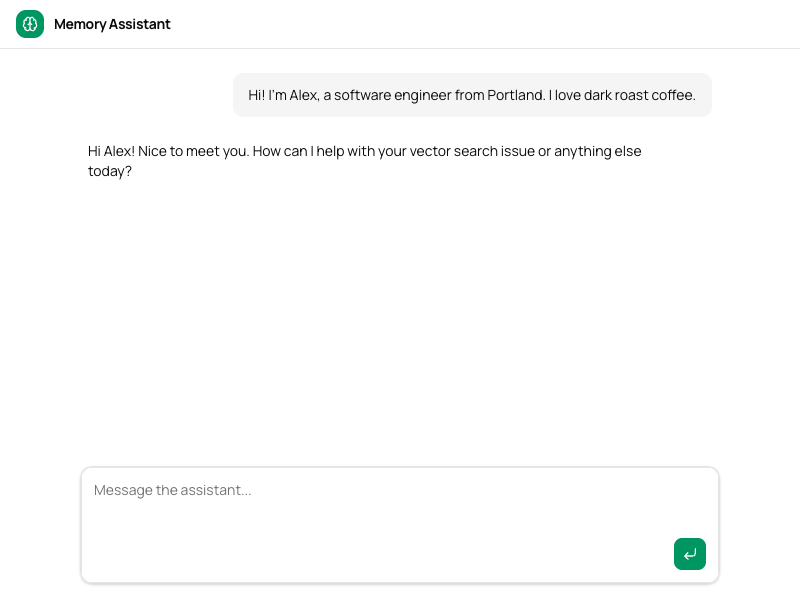
You now have a basic assistant wired together in minimal code. It won’t remember anything between sessions, but you can talk to it like you would ChatGPT.
Designing the memory lifecycle
Before we wire memory up, we need to think about how it fits into our product. LLMs can’t keep going forever. They are constrained in several ways:
- LLMs have context limits that eventually prevent you from sending more input in the same session.
- LLMs pay more attention to the start and end of their context window than to the middle. For an assistant, the initial messages and the latest ones always carry the most weight.
- LLMs have diminishing returns past a certain context size (e.g., ~200,000 tokens for OpenAI models), and going beyond that increases the risk of hallucinations.
- LLMs are hardwired through reinforcement learning to reach an “end state” where they solve a problem. If you’re a Claude user, you may have noticed how it gets short once it thinks it’s answered your question, and keeping the conversation going past that point almost becomes painful.
These constraints mean we need a natural end point for a session. For an assistant, that’s inactivity: when the user stops messaging, we know they’re done, so we end the session and save what happened. Most teams call this compaction.
For users who never go idle, we need to force sessions to end. Teams call this forced compaction: write memories, carry them into a new session, keep going. We want to avoid it when possible, and reinforcement learning helps. Models like Claude Sonnet and Opus naturally steer conversations toward resolution, nudging the user toward a stopping point.
So we know when to write memories. The next question is what to write. We need episodic memory to summarize past conversations, semantic memory to remember durable facts about the user, and a recall mechanism for finding relevant past sessions once there are too many to include directly.
These three memory types let the assistant:
- Summarize past sessions, i.e., “what happened before the user went idle”
- Maintain a fact sheet about the user, e.g., “what is their name?”
- Recall past sessions by topic, i.e., “what did we talk about last week?”
| Layer | Memory type | Primitive | What it does |
|---|---|---|---|
| Working | Current context | Recent messages | Last N messages kept verbatim |
| Episodic | What happened | Summarizer | Distills each session into a structured log |
| Semantic | Who this person is | Summarizer | Extracts durable facts into a structured user profile |
| Vector recall | Specific past conversations | Vector DB | Indexes session summaries for similarity search |
I covered LLM memory types in a previous post if you want to know more about how to design this.
Notice the summarizer appears twice. Episodic and semantic memory both use summarization, but for different purposes: episodic distills one session into a log of events. Semantic extracts durable facts across many sessions into a structured profile. Same primitive, different keys, different prompts.
The flow:
- User chats → conversation accumulates (working memory)
- User goes idle → session boundary fires
- On boundary → extract episodic, semantic, and vector memories
- User returns → fresh session, bootstrapped with stored memories
Now we know what to build, so let’s get to it!
Structuring memory
Multiple parts of the app use memory: The chat route reads it, the save endpoint writes it. Best to wrap it in an interface we can iterate on internally and plug in wherever it’s needed:
// src/lib/memory.ts
type SessionMessage = { role: "user" | "assistant"; content: string };

class MemoryManager {
  async prompt(userId: string, messages: SessionMessage[]): Promise<PromptPlugin> {
    // Build a memory-aware prompt for the chat route
  }

  async save(userId: string, messages: SessionMessage[]): Promise<void> {
    // Extract and store memories when a session ends
  }
}

export const Memory = new MemoryManager();
Plugging the module into our assistant is straightforward:
// app/api/chat/route.ts
...
const memory = await Memory.prompt(userId, messages);
const rendered = await cria
  .prompt(provider)
  .system(SYSTEM_PROMPT)
  .use(memory)
  .render({ budget: 40_000 });

return streamText({ ..., messages: rendered }).toDataStreamResponse();
...
The other methods wire up to other routes. In the demo, we added a “Save Session” button that forces the session to end. Much easier for testing than waiting minutes for the inactivity trigger.
Layer 1: episodic. What happened
When a session ends, we have a full conversation sitting in memory. Could be five messages, could be 50. Before we throw it away, we want to save the important pieces: what was the user trying to do, what happened, and what’s left unresolved. That’s episodic memory: a structured log of the session.
We need two things for this: somewhere to store these summaries, and something that can distill a conversation into one. We’ll use SQLite for storage since we’re prototyping, and Cria gives us a summarizer primitive that does the extraction:
const summaryStore = new SqliteStore<StoredSummary>({
  filename: "./data/cria.sqlite",
  tableName: "cria_summaries",
});

// Factory: same store, different IDs and prompts produce different summaries.
const summarizer = (id: string, prompt?: string) =>
  cria.summarizer({ id, provider, store: summaryStore, priority: 2, prompt });
A summarizer takes a conversation in, extracts the pieces you care about according to your prompt, and stores the result. Call it again with new input, and it rolls the new content into the existing summary. Our save method is one call:
async save(userId: string, messages: SessionMessage[]) {
  const date = new Date().toISOString().split("T")[0];
  const summary = await summarizer(
    `episodic:${userId}`,
    `Summarize this conversation into a structured session log.

Date: ${date}
Objective: What the user was trying to do.
Timeline: Bullet points of what happened, key decisions and discoveries.
Outcome: What got done, what's unresolved.

Keep it concise. No markdown formatting. One line per bullet.`,
  ).writeNow({ history: toScope(messages) });
}
We customize the prompt so the output is structured and scannable rather than a wall of prose. For example, if the user talks about deploying to Vercel, we may end up with a summary such as:
Date: 2026-02-13
Objective: Deploy a Next.js app to Vercel.
Timeline:
- User confirmed app is running locally and hosted on GitHub.
- Discussed managing environment variables for database connections and API keys.
- Discovered Vercel supports separate env vars for production and preview deployments.
- User noted they could point preview deployments to a staging database.
- Explored secrets management for CI pipeline; Vercel integrates with HashiCorp Vault and AWS Secrets Manager.
- User flagged potential compliance requirements for health data.
Outcome: Deployment approach settled. Pending: security team input on
compliance requirements for secrets management.
The model now knows what the user was trying to do, what they tried, and where they left off.
Now we wire the summary back into the prompt so the model sees it when the user returns:
async prompt(userId: string, messages: SessionMessage[]) {
  const previousSession = await summarizer(`episodic:${userId}`).get();

  return cria.prompt(provider)
    .system(`## Previous Session\n${previousSession}`)
    .use(
      // Safeguard: if the conversation outgrows the token budget,
      // the summarizer kicks in and condenses older messages.
      summarizer(`history:${userId}`).plugin({
        history: toScope(messages),
      })
    );
}
We read the stored summary from last session and inject it as context. We wrap the current conversation in a summarizer plugin that acts as a compaction safeguard: Most of the time messages pass through unchanged, but if the conversation outgrows the token budget, the summarizer kicks in and condenses older turns automatically. The same primitive we use to save memories between sessions also protects us within a single session.
That single layer already lets the user leave and come back the next day with context intact. The problem is that each save overwrites the previous summary. Storing them separately doesn’t help much either: The model would read disconnected session logs. It knows what happened each time but has no coherent picture of who this person is.
Layer 2: who is this person
After three sessions, the model might know:
- Session 1: User asked about Python pandas.
- Session 2: User debugged a data pipeline.
- Session 3: User asked about deployment.
These are isolated events. What we want the model to know is: this is a data engineer who works primarily in Python and is currently building a pipeline they want to deploy. That’s semantic memory. Durable facts that persist regardless of which session they came from.
The approach is simple: take each session summary and feed it into a second summarizer that maintains a rolling user profile. Same tool, different purpose. We extend save to capture the summary and pipe it forward:
async save(userId: string, messages: SessionMessage[]) {
  const date = new Date().toISOString().split("T")[0];
  const summary = await summarizer(
    `episodic:${userId}`,
    `Summarize this conversation into a structured session log.

Date: ${date}
Objective: What the user was trying to do.
Timeline: Bullet points of what happened, key decisions and discoveries.
Outcome: What got done, what's unresolved.

Keep it concise. No markdown formatting. One line per bullet.`,
  ).writeNow({ history: toScope(messages) });

  await summarizer(
    `profile:${userId}`,
    `Extract durable facts about the user. One fact per line as 'category: value'.
Categories: name, role, company, tools, preferences, current projects.
Only include facts explicitly stated. Omit unknown categories.
When new info contradicts old, keep only the latest.`,
  ).writeNow({ history: cria.user(`Session summary:\n${summary}`) });
}
Two summarizers, two keys, two different prompts. The episodic summarizer produces a structured session log. The profile summarizer extracts durable facts and stores them as a flat list. After the first session (deploying to Vercel), the stored profile contains:
tools: GitHub, Vercel, HashiCorp Vault, AWS Secrets Manager
preferences: Staging database for preview deployments
current projects: Deploying a Next.js app to Vercel
The user comes back the next day and debugs a React performance issue. After that session ends, the profile has grown:
tools: Next.js, Vercel, GitHub, React
preferences: Staging database for preview deployments
current projects: Deploying a Next.js app to Vercel, Fixing re-rendering in a React list component
Same store, same key. The summarizer rolled the new session’s facts into the existing profile. current projects expanded. tools updated. When the user switches from one tool to another, the “contradicts old, keep only the latest” instruction means the profile stays current automatically.
And in prompt, we add the profile at the top:
async prompt(userId: string, messages: SessionMessage[]) {
  const userProfile = await summarizer(`profile:${userId}`).get();
  const previousSession = await summarizer(`episodic:${userId}`).get();

  return cria.prompt(provider)
    .system(`## What You Know About The User\n${userProfile}`)
    .system(`## Previous Session\n${previousSession}`)
    .use(
      summarizer(`history:${userId}`).plugin({
        history: toScope(messages),
      })
    );
}
The prompt is growing. First, the user profile (a structured fact list), then the last session summary (what happened last time), then the current conversation. The model hasn’t seen a single new message yet and already knows the user’s tools, preferences, and current projects.
Layer 3: we talked about this
The profile tells the model who this person is. The episodic summary tells it what happened last time. But neither helps with “remember that restaurant you mentioned last week?” The profile doesn’t track individual recommendations, and old session summaries aren’t searchable by topic.
Vector search fills that gap. The idea: turn each session summary into an embedding (a list of numbers that captures its meaning) and store it. Later, when the user asks a question, embed that question too and find the past sessions whose embeddings are most similar. “What restaurant?” matches the session where restaurants were discussed, even if the word “restaurant” never appeared in the summary itself.
We set up a vector store backed by the same SQLite database, with OpenAI’s embedding model to convert text into vectors:
const vectorStore = new SqliteVectorStore<string>({
  filename: "./data/cria.sqlite",
  tableName: "cria_vectors",
  dimensions: 1536,
  embed: async (text) => {
    const { embedding } = await embed({
      model: openai.embedding("text-embedding-3-small"),
      value: text,
    });
    return embedding;
  },
  schema: z.string(),
});

const vectorDB = cria.vectordb(vectorStore);
One more addition to save. After updating the profile, we index the session summary so it’s searchable by similarity:
async save(userId: string, messages: SessionMessage[]) {
  const date = new Date().toISOString().split("T")[0];
  const summary = await summarizer(
    `episodic:${userId}`,
    `Summarize this conversation into a structured session log.

Date: ${date}
Objective: What the user was trying to do.
Timeline: Bullet points of what happened, key decisions and discoveries.
Outcome: What got done, what's unresolved.

Keep it concise. No markdown formatting. One line per bullet.`,
  ).writeNow({ history: toScope(messages) });

  await summarizer(
    `profile:${userId}`,
    `Extract durable facts about the user. One fact per line as 'category: value'.
Categories: name, role, company, tools, preferences, current projects.
Only include facts explicitly stated. Omit unknown categories.
When new info contradicts old, keep only the latest.`,
  ).writeNow({ history: cria.user(`Session summary:\n${summary}`) });

  await vectorDB.index({
    id: `session:${userId}:${date}:${Date.now()}`,
    data: summary,
  });
}
That’s the complete save. Three writes when the session ends: distill the conversation into a session log, update the user profile, index for search. The summary already carries its own date and timeline, so the vector index gets rich, structured content to embed. All three happen at the same moment because that’s when the context is complete: The user has signaled “we’re done” through inactivity or clicking save.
Now the final version of prompt. We add vector search using the user’s latest message as the query. And since vector search can surface any relevant past session by similarity, we no longer need the explicit previous session summary. If the last session is relevant to what the user is asking about, it’ll show up in the results.
async prompt(userId: string, messages: SessionMessage[]) {
  const userProfile = await summarizer(`profile:${userId}`).get();
  const latestQuestion = messages.findLast((m) => m.role === "user")?.content ?? "";

  return cria.prompt(provider)
    .system(`## What You Know About The User\n${userProfile}`)
    .use(vectorDB.plugin({ query: latestQuestion, limit: 4 }))
    .use(
      summarizer(`history:${userId}`).plugin({
        history: toScope(messages),
      })
    );
}
That’s the complete prompt function we’ve been building toward. Three blocks: who this person is, what past sessions are relevant, and the current conversation. When the user asks “what restaurant did you recommend?”, the vector plugin finds the session where food came up, even if it was weeks ago. No explicit tagging, no categories to maintain.
One caveat: Embedding full session summaries works well when sessions are focused on a single topic. It gets weaker when a session covers multiple unrelated topics because the embedding becomes a “semantic average” that matches none of them precisely. Production systems handle this by indexing at topic-level granularity rather than session-level, or by combining semantic search with keyword search to catch what embeddings miss. For a starting point, per-session indexing gets you surprisingly far.
And when the token budget fills up, Cria drops layers in a predictable order:
| What drops first | What happens |
|---|---|
| Vector recall | “We discussed this last week” stops working |
| Conversation history | Older turns get progressively summarized |
| User profile | Minor friction, user re-explains preferences |
Everything degrades gracefully. For more on prompt layout and priority-based degradation, see the LLM memory guide.
Wiring it up
Here’s the full chat route. Compare it to our starting point: The only addition is composing Memory.prompt() into the request.
// app/api/chat/route.ts
import { Memory, model, provider } from "@/lib/memory";

export async function POST(req: Request) {
  const { messages, userId } = await req.json();

  const memoryPrompt = await Memory.prompt(userId, messages);

  const rendered = await cria
    .prompt(provider)
    .system(SYSTEM_PROMPT)
    .use(memoryPrompt)
    .render({ budget: 40_000 });

  return streamText({ model, messages: rendered }).toDataStreamResponse();
}
The app owns the system prompt. Memory is a plugin that slots in via .use(). render({ budget: 40_000 }) is where Cria figures out what fits and what gets dropped. The save endpoint is equally simple:
// app/api/save/route.ts
export async function POST(req: Request) {
  const { userId, messages } = await req.json();
  await Memory.save(userId, messages);
  return Response.json({ ok: true });
}
The result
The user introduces themselves. They click “Save session.” The system writes episodic, semantic, and vector memories. New session, empty chat. “What do you remember about me?”
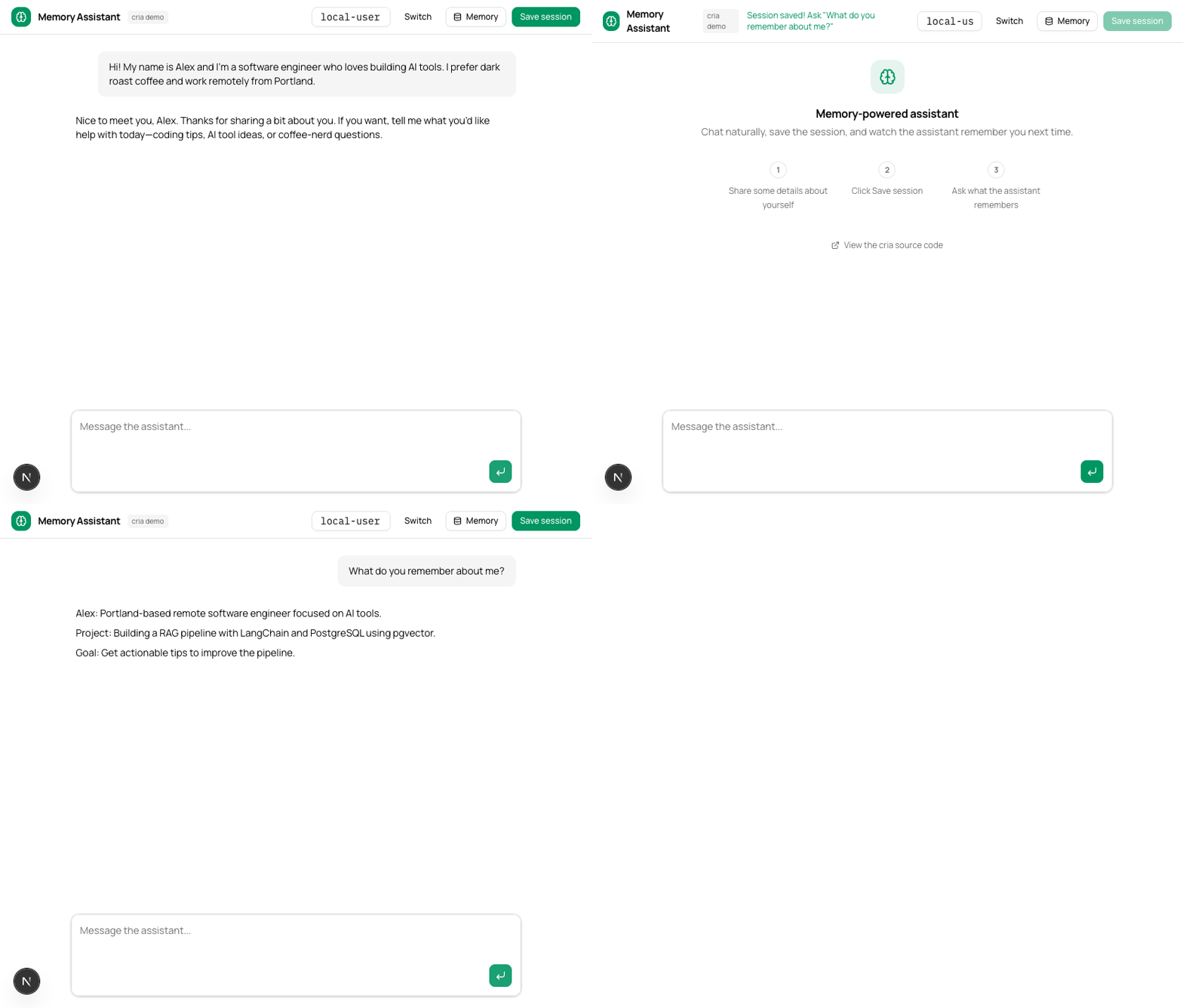
The assistant knows their name, location, what they’re working on, and what they wanted help with. Three memory layers, composed into a single prompt builder. The user never re-introduced themselves.
Where to go from here
What we built is a working memory system, not a finished one. Three directions to explore:
Iterate on the prompts with real conversations. The prompts we used are a starting point. Your product’s conversations will be different. Run a handful of real sessions through the summarizer, read the output, adjust. The shape of what gets stored is entirely determined by the prompt.
Consider atomic facts and knowledge graphs. Our profile summarizer rolls new facts into an existing summary, which works but is lossy. Mem0 extracts individual facts and diffs them (add, update, delete) so nothing gets silently dropped. Zep goes further and builds a knowledge graph from conversations, capturing entities and their relationships over time. That precision matters when your product relies on remembering specific details.
Let your product decide what to remember. A coding assistant needs to remember file paths and error patterns. A health app needs to remember medications and allergies. A tutoring app needs to remember what the student already understands. The memory layers are the same. The prompts and what you index are completely different. Start with what your users complain about forgetting.
For the theory behind these layers, see our guide to LLM memory and memory systems explained. And if you want to see where this composable approach goes at scale, read OpenAI’s writeup on their in-house data agent. They use six context layers with the same fundamental pattern: different prompts producing different memory shapes, all composed into a single context window. The fact that this architecture works for an internal tool processing millions of queries is a strong signal that the building blocks we used here are the right ones.