
Design Your LLM Memory Around How It Fails
Not all context is sacred. Design your agent's memory around what happens when critical information gets dropped.
Thursday afternoon. Your security team pings you:
Jon @blue-team: The Next.js RCE vulnerability just dropped. What version were we running on Monday? Were we exposed? Do we need to check logs for exploitation attempts?
You: Wait what? What versions are affected?
Jon @blue-team: 15.0.5, 15.1.9, 15.2.6, 15.3.6, 15.4.8, 15.5.7, 15.6.0-canary.58, 16.0.7 have been patched and are safe.
You ask your dependency auditing agent. It doesn’t know.

On Monday, it made several tool calls and analyzed 2,400 packages with version numbers (~60k tokens). The memory system summarized the results and discarded most version numbers.
Dependency audit complete: 2,400 packages scanned across 12 workspaces.
Key frameworks: Next.js, React, Prisma. 2 moderate vulnerabilities found in dev dependencies.
Versions: {"prisma": "6.1.1", "react": "19.2.1", ... }
Next.js was not in the versions list. The one fact that matters (what version were we running on Monday?) is gone. The agent trusts its own memory. It doesn’t check the logs.
The agent can fabricate a version, admit ignorance, or tell you “Next.js wasn’t flagged, you should be good”. Option three is the disaster. The agent was never supposed to be the source of truth. But it answered confidently, and confidence is contagious. You don’t check the logs. Meanwhile, attackers may have had a window you’ll never know about.
The CVE is real. The scenario is hypothetical. But silent false negatives from lost context happen constantly.
The Problem: All Context Gets Treated Equally
Most LLM memory systems work the same way: append everything to a chronological buffer, run some RAG (and pray), and hope the right tokens survive when you hit the limit.
Those version numbers needed to be sacred or discarded completely. Instead, they got the same treatment as idle chit-chat: summarized into oblivion.
New to LLM memory? Check out LLM Memory Systems Explained for background, or Memory Isn’t One Thing for why generic solutions fail.
Failure-First Design
When people talk about LLM memory, they start with architectures: vector vs. graph, RAG vs. long context, summarization vs. extraction.
That’s the wrong starting point.
How does your system fail when context is missing? That’s the first question.
Different agents fail in different ways:
- A support chatbot tolerates fuzzy recall. Miss a minor detail, give a decent answer. No one notices.
- A vulnerability agent cannot miss the one critical version number in a pile of false positives. One false negative and the customer walks.
- An SRE agent cannot quietly ignore the only log line that explains why prod is on fire. Waste the on-call’s time once, and they rip it out of the incident channel.
Different failure modes require different memory shapes.
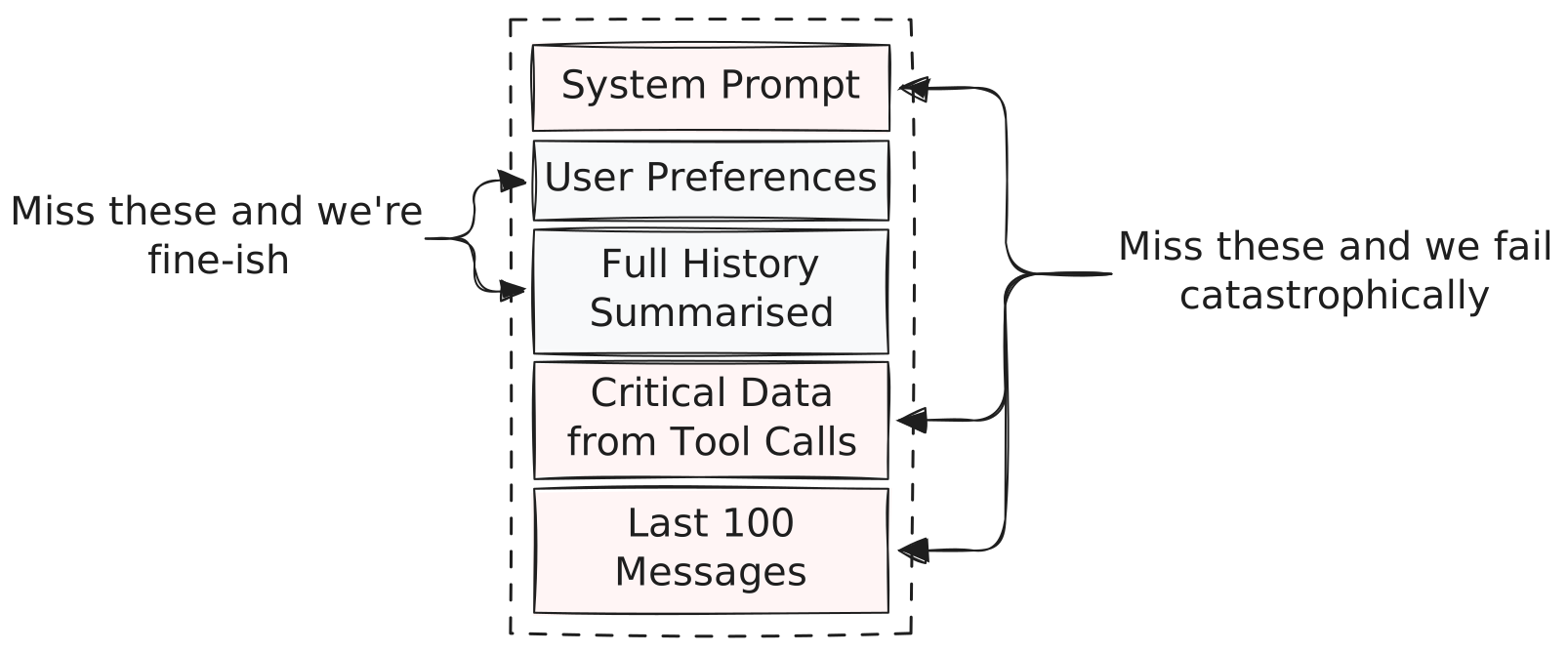
Threat Modeling for Context
This is effectively threat modeling, but for attention spans instead of security boundaries.
For every piece of data you want to put in the prompt, ask:
| Question | Policy |
|---|---|
| Missing context produces dangerous output? | Sacred. Never drop. |
| Summarization causes false confidence? | Critical. Never compress. |
| Truncation causes noticeable quality loss? | Important. Compress last. |
| Removal still leaves useful output? | Expendable. Drop first. |
Back to the dependency auditor:
| Context Type | Failure Mode | Policy |
|---|---|---|
| Version numbers from tool output | Silent false negatives | Sacred. Never drop. |
| User’s prioritization decisions | Mild confusion on follow-up | Important. Compress last. |
| Reasoning steps | None (can be reconstructed) | Expendable. Drop first. |
This exercise doesn’t tell you what to mark sacred. You can’t know a version number matters until a CVE drops. But it forces you to decide what happens when you’re wrong, before you’re wrong.
Once you’ve done this, the architecture follows naturally. Sacred content stays in fixed context, not semantic retrieval. Expendable content can live in RAG and get evicted freely. The hard part isn’t choosing between vector, graph, or long-context. It’s knowing what you can’t afford to lose.
Making Trade-offs Explicit
Once you know what’s sacred and what’s expendable, enforce it. Several companies building serious LLM applications have already solved this, each in their own way.
One useful mental model comes from the Cursor team, who frame context management as a layout problem, not a storage problem (Lex Fridman interview). Instead of a flat buffer where everything competes equally, imagine regions with different eviction policies:
cria
  .prompt()
  // Sacred: never drop
  .system(systemPrompt)
  .assistant(toolOutputs)  // Version numbers live here

  // High priority: compress last
  .last(messages, { n: 50, priority: 1 })

  // Low priority: drop if space is tight
  .omit(
    cria.prompt().assistant(retrievedFacts),
    { priority: 2, id: "retrieved-facts" }
  )

  // Expendable: drop first
  .summary(olderHistory, { id: "older-history", store, priority: 3 });
When a user pastes a 20k-token stack trace, the layout engine knows what to sacrifice. Sacred regions don’t shrink. Low-priority regions absorb the pressure. If sacred regions alone exceed your budget? Probably better to crash than to silently drop something critical.
The value isn’t the specific implementation. It’s that the trade-offs are explicit in the code. You can look at this and know exactly what gets dropped when space runs out. No implicit decisions buried in a summarization heuristic.
You don’t need a layout engine to apply this. Separate prompt sections. Different summarization policies per source. A simple check that critical data hasn’t been truncated. The point is deciding explicitly, before your agent decides implicitly in production.
Most memory systems are built around a question of capacity: How much can I fit?
The better question is: What happens when I can’t fit everything?
If you don’t have an answer, your agent will improvise one. In production, under load, when it matters most.